Email forwarding allows you to automatically send copies of incoming messages to another email address. This is useful if you want to receive mail in multiple inboxes or transition between addresses.
Below is the easiest way to add a forward using Webmail.
Add a Forward from Webmail
Step 1: Log in to Webmail
-
Go to Webmail
-
Sign in using:
-
Your full email address (for example:
you@yourdomain.com) -
Your current email password
-
Step 2: Open Account Settings
-
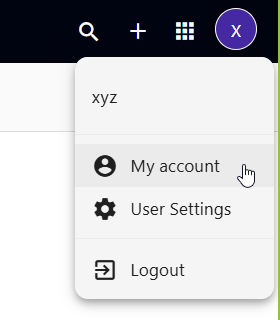
In the top-right corner, click the User icon
-
From the menu, select My account
Step 3: Add the Forwarding Address
-
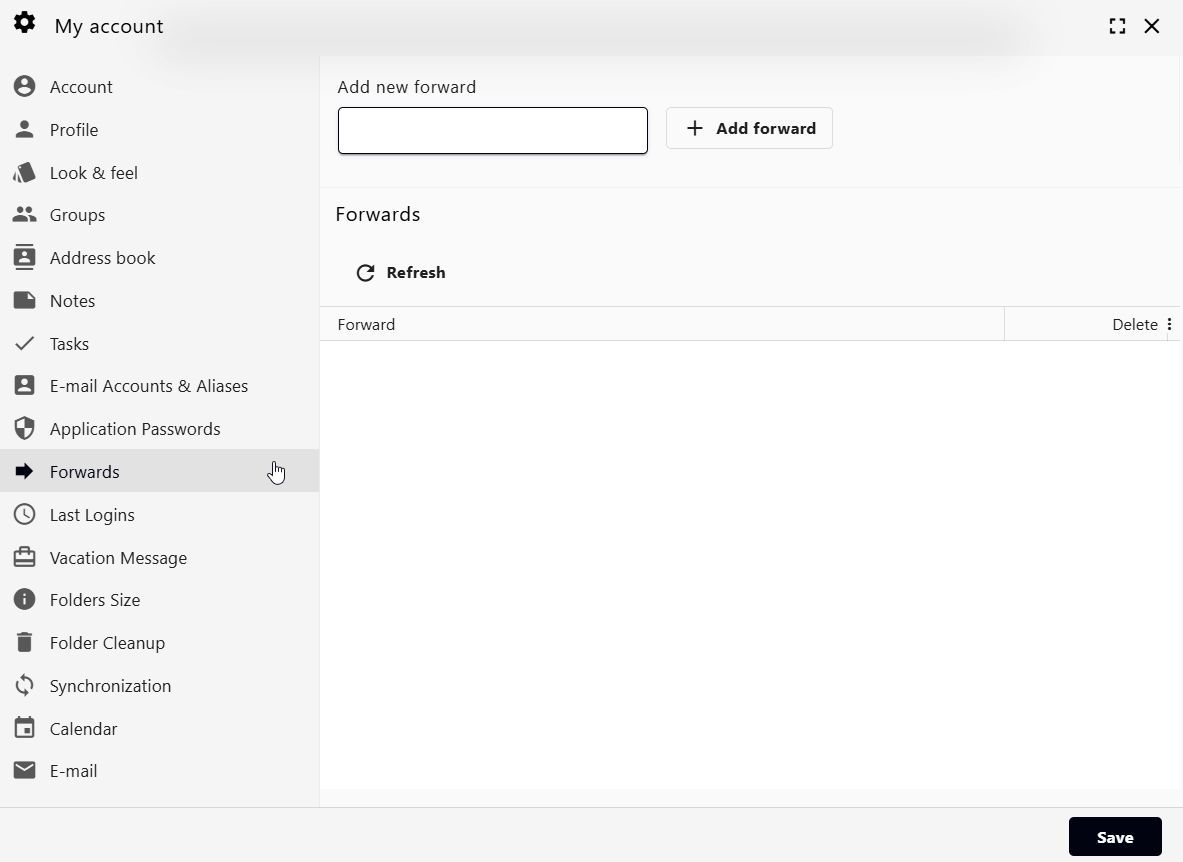
Click the Forwards tab
-
In the Email address field, enter the destination email address
(this is where your emails will be forwarded to) -
Click Add forward
The forward is active immediately.
Notes & Tips
-
Forwarding does not delete mail from your inbox — it sends a copy
-
You can add multiple forwarding addresses if needed
-
Forwards can be removed or edited at any time from the same screen
If you’d like help setting up forwards for multiple mailboxes or at the domain level, Thexyz Support is happy to help.